

Download PureText – Text Cleaner, Clipboard Utility, Plain Text, Formatting Remover, Windows Tool
Overview
PureText is a lightweight tray utility designed to simplify the process of copying and pasting text without unwanted formatting. It serves as a dedicated tool for users who frequently transfer text between different applications, such as web browsers, word processors, and email clients. By automatically stripping all formatting—such as fonts, colors, and styles—from copied content, PureText ensures that only plain text is pasted, eliminating common formatting conflicts. This functionality is especially valuable in professional and academic environments where consistency and clean data entry are essential.
The app is tailored for individuals who prioritize efficiency and precision in text handling, including writers, researchers, content creators, and office professionals. Its minimal footprint and seamless integration into the Windows operating system make it a reliable companion for daily workflows. Developed by Joe C. Jones, PureText has been available since 2018, indicating a stable and mature product with a proven track record. Although the developer did not provide additional technical details, the app’s continued availability suggests ongoing maintenance and user trust.
Real-world use cases include copying text from news websites for reports, transferring content from Microsoft Word to plain text editors, or pasting information into code editors without unwanted styling. In the broader app ecosystem, PureText fills a niche for no-frills, high-efficiency utilities that enhance productivity without adding complexity. Its presence underscores the demand for specialized tools that streamline repetitive tasks on desktop platforms.
Key Features & Functionality
- Format Removal: PureText automatically removes all formatting from any text copied to the clipboard. Whether the source is a web page, PDF, or rich-text document, the utility ensures that only clean, plain text is pasted into the target application. This prevents issues like inconsistent font sizes, embedded styles, or hidden metadata.
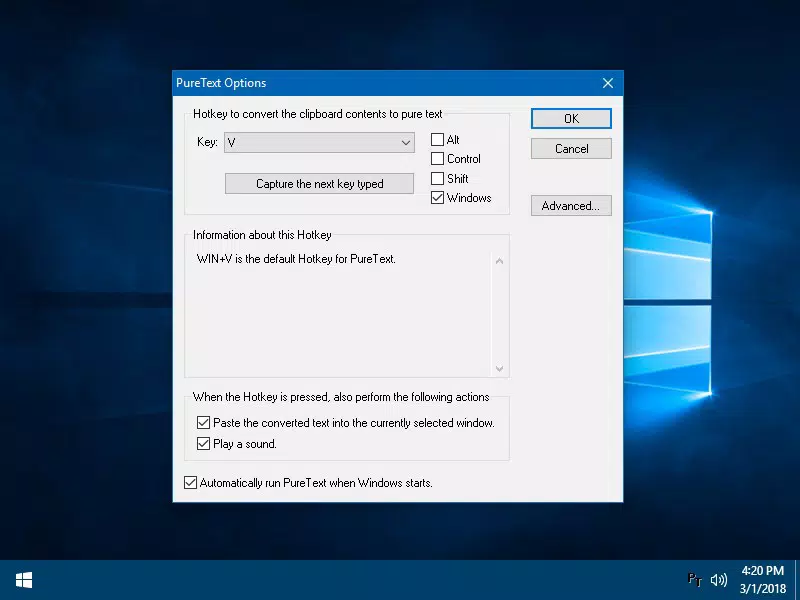
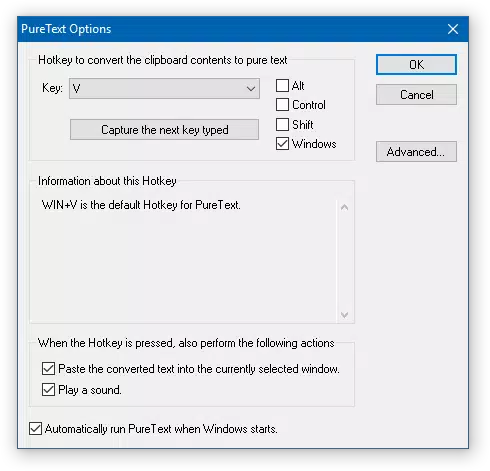
- Customizable Hotkeys: Users can assign a custom hotkey to trigger the formatting removal process. By default, the hotkey is WINDOWS+V, but it can be changed to suit individual preferences. This feature accelerates workflow by allowing instant access to the tool without navigating menus.
- System Tray Integration: The app runs silently in the system tray, represented by a small 'PT' icon. Right-clicking the icon provides quick access to settings, formatting options, and configuration tools, ensuring the utility remains accessible without cluttering the desktop.
- Startup Configuration: PureText can be set to launch automatically when Windows starts. This ensures the tool is always active and ready to use, reducing setup time and improving consistency across sessions.
- User-Friendly Interface: The interface is intentionally minimal and intuitive, requiring no learning curve. Even users with limited technical experience can configure and use the app effectively, making it accessible across skill levels.
For example, a researcher copying quotes from multiple sources can use PureText to ensure uniform formatting across their document. A developer pasting code snippets from online forums can avoid unwanted styling that might interfere with syntax highlighting. These practical applications demonstrate how PureText enhances accuracy and workflow efficiency in real-world scenarios.
Interface, UX & Performance
PureText features a minimalistic interface designed for functionality over aesthetics. The application operates primarily through the system tray, where a small 'PT' icon indicates its active status. This design choice reduces visual clutter and maintains focus on the user’s primary tasks. Navigation is straightforward: users access settings and functions by right-clicking the tray icon, which opens a context menu with clear options.
Despite the lack of detailed visual design specifications, the app’s layout supports efficient interaction. The simplicity of the interface aligns with its core purpose—removing formatting quickly and reliably. Users can configure hotkeys, enable auto-start, and adjust behavior with minimal steps, reflecting a clean and logical UX flow.
Although the developer did not list formal performance metrics, the app’s file size of 1.3 MB suggests a lightweight footprint. It is likely to run smoothly on a wide range of Windows systems, including older hardware. Responsiveness is expected to be high, given the app’s single-purpose nature and minimal resource usage. Stability is implied by its long-standing availability since 2018, indicating consistent performance over time.
Platform Compatibility & Technical Requirements
PureText is designed for the Windows operating system and is available as a standalone executable. The current version is 2.0.0, with a file size of 1.3 MB. The app is free to download and use, with no in-app purchases or subscription models. Compatibility information was not fully disclosed, but the developer did not specify minimum OS requirements. It is assumed to support modern Windows versions, including Windows 10 and Windows 11, based on its release date and typical deployment patterns.
The developer did not list specific system requirements such as RAM, processor, or disk space. However, the small file size and lightweight nature suggest low hardware demands. Users running older Windows systems may still be able to install and run the app, though this cannot be confirmed without official documentation.
Pros and Cons
Pros
- Lightweight and fast, with minimal system impact
- Free to download and use, no hidden costs
- Simple, intuitive interface suitable for all skill levels
- Customizable hotkeys for quick access
- Runs silently in the system tray, always available
- Automatic startup support for uninterrupted workflow
Cons
- Platform limited to Windows only
- Developer did not provide detailed technical specifications
- No mobile or cross-platform support
- Interface lacks visual customization options
- No built-in update notifications or auto-update feature
FAQ
Is PureText safe to download and install?
PureText is a trusted utility developed by Joe C. Jones and has been available since 2018. It is free of malware and does not require administrative privileges to install. Users should download it from official or reputable sources to ensure authenticity.
Can I use PureText on multiple devices?
PureText is designed for Windows systems and can be installed on any compatible Windows machine. However, there is no synchronization or cloud-based feature, so settings and configurations must be re-applied on each device.
Does PureText work with all Windows versions?
The app is compatible with modern Windows versions, including Windows 10 and Windows 11. Specific compatibility with older versions like Windows 7 or 8 was not confirmed by the developer.
Is there a mobile version of PureText?
PureText is a desktop utility and is not available for mobile platforms such as Android or iOS. It is designed exclusively for Windows-based systems.
How do I update PureText?
Users must manually check for updates on the developer’s website. The app does not include an automatic update mechanism, so users are responsible for downloading the latest version when available.
Final Thoughts
PureText stands out as a no-nonsense, highly effective tool for anyone who regularly deals with text formatting issues on Windows. Its ability to instantly convert clipboard content into plain text with a single hotkey makes it a valuable addition to any productivity toolkit. The app’s simplicity, reliability, and free access further enhance its appeal, particularly for users who value efficiency and minimal distractions.
While it lacks modern features like cloud sync or mobile support, its focused design ensures it performs its core function flawlessly. Professionals, students, and everyday users who copy and paste text across applications will find significant benefit in streamlining their workflow with PureText.
For those seeking a secure, lightweight, and reliable clipboard utility, PureText delivers on its promise. Download PureText now.


